Despite the steady move to the cloud, the majority of the dental practices we look after still hold data on the premises, and that data is only safe if it is backed up. Making sure that is happening is the practice owner's responsibility, not something to assume is sorted. It matters more than ever now, because the solid state drives inside modern PCs and servers have a reputation for reliability they have not quite earned.
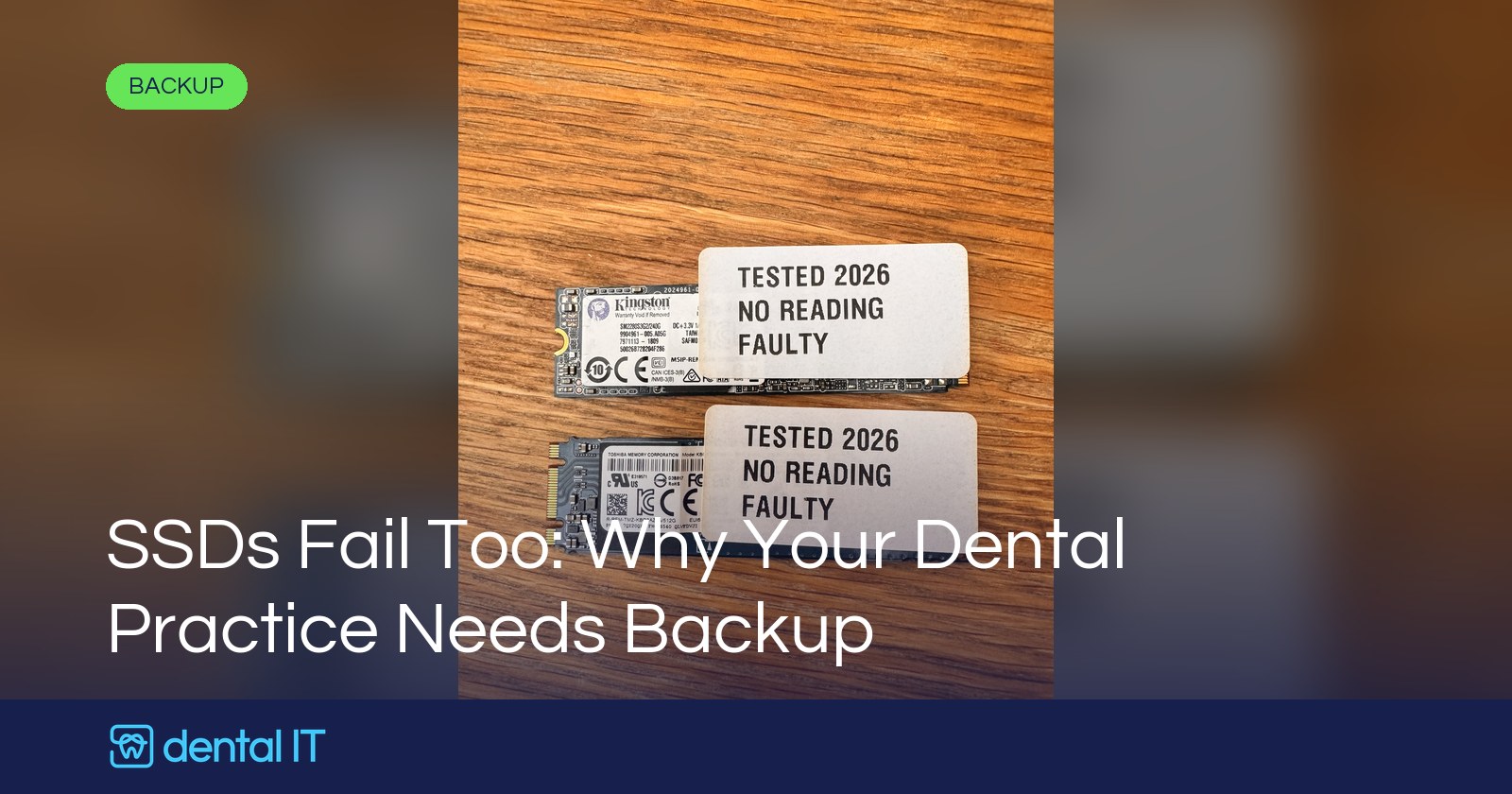
The photo on this page shows two of them. Both are sitting in our workshop as I write this, both have been tested, and both are completely dead. More on those shortly.
The move to solid state
Almost every new PC, laptop and server now arrives with solid state storage: SATA SSDs, mSATA cards, and the little M.2 NVMe sticks that look like a stick of chewing gum. No moving parts, quick, quiet, and we fit them as standard. Meanwhile plenty of older mechanical hard drives, the ones with spinning platters, are still in service in practices up and down the country, often in the server or in a surgery PC that has run the imaging software for years.
The assumption we hear a lot is that solid state means safe. No moving parts, so nothing to wear out, so nothing to worry about. That is not how it works.
More reliable is not the same as fault-free
In our experience solid state drives are generally somewhat more reliable than mechanical disks. They shrug off knocks and vibration, there is no bearing to wear or head to crash, and they run cooler. All genuinely good.
But they are very far from fault-free. SSDs fail in their own ways:
- The controller or firmware dies. The memory chips may be fine, but the small computer that manages them stops responding and the drive simply vanishes from the machine.
- The flash wears out. Every memory cell has a finite number of writes, and a busy server drive can use that up.
- Power problems. A sudden power cut in the middle of a write can corrupt the drive's internal map of where everything lives, which is one of the reasons we still recommend a UPS.
- Plain bad luck. Some drives arrive with a weakness and fail young.
The really important difference is how they fail. A mechanical disk often gives you warning: it gets noisy, it slows down, monitoring picks up the errors. A solid state drive tends to work perfectly right up until the moment it does not. One morning the machine will not boot, or the drive is not there at all. And when an SSD dies, getting data back off it is harder and dearer than from a mechanical drive, and sometimes not possible at all.
Two from our workshop this week
The two drives in the photo are a good illustration. One is a 240GB M.2 SATA drive, the other a 512GB NVMe drive, from two different well-known manufacturers. Both came out of practice machines, both have been through our testing, and both now carry the same label: no reading, faulty. There is nothing to recover from either.
That is fine, because the data on them was held centrally and backed up, so the fix was a new drive and a restore. With no central data store and no backup strategy, that data would simply be gone. For a dental practice that is not just an operational headache. It is a compliance problem too.
Why this is a compliance issue, not just an IT one
Patient records, clinical notes, radiographs and the rest are personal data, and much of it is special category health data. UK GDPR expects you to have measures in place to restore access to that data promptly if something goes wrong, and NHS practices confirm each year through the Data Security and Protection Toolkit that backups are in place and tested. If a drive fails and the records on it are lost, "the SSD died" is not an answer the Information Commissioner's Office, the CQC or an unhappy patient will accept. Our compliance page covers how we help with this.
Being responsible for the data does not mean doing the backup yourself. It does mean being able to ask whoever looks after your IT "where is our data, and when was it last backed up and tested?" and get a straight answer.
Where on-premises data hides in a dental practice
Even practices that think of themselves as cloud-first usually have more local data than they realise:
- Digital imaging. X-rays, CBCT scans and intraoral scans are large files, and they very often live on a dedicated PC in the surgery or on the imaging server rather than in the cloud. Our digital imaging support page covers how we look after these.
- The practice management system. If your PMS is the on-premises kind, its database is the single most important file in the building.
- Documents and spreadsheets. Staff rotas, lab sheets, price lists, policies and audits, saved to a desktop or a shared folder on the server.
- Images and scans. Clinical photos, scanned letters and referrals, consent forms.
- Everything else. Email archives, accounts exports, the HR folder.
If any of that exists on only one drive in one PC or server, it is one failure away from being gone.
Never trust a single drive, PC or server
The rule is simple. Wherever you have data on site, never trust a single drive, a single PC or a single server to keep it safe on its own. Solid state or not, new or old, it still has to be backed up. This is what good looks like:
- Keep data in one place. A central server or NAS rather than files scattered across individual PCs. Centralised data is far easier to protect, and a PC can then fail without taking anything irreplaceable with it.
- Back it up automatically. Image based backups of the whole server, taken on a schedule nobody has to remember.
- Keep a copy off site. An encrypted cloud copy protects you when the building is the problem, not just the drive.
- Make it immutable. Backups that cannot be altered or deleted, so ransomware cannot take them out along with the live data.
- Monitor it and test restores. A backup nobody checks is a hope, not a plan. We are alerted when a backup fails, and we test that restores actually work.
If that sounds like more than you have at the moment, our backup systems for dental practices page explains how we put it together. And if you are still relying on an external drive on a shelf, we wrote about why that is a poor backup earlier this year.
The takeaway
Solid state drives are a good thing and we will keep fitting them. Just do not let the lack of moving parts lull you into thinking the data on them is safe. The two in our workshop this week say otherwise.
If you are not sure where your practice data lives, or when it was last backed up and tested, get in touch. We will tell you honestly where the gaps are, and our monitoring keeps an eye on it day to day for the practices we look after.